説明
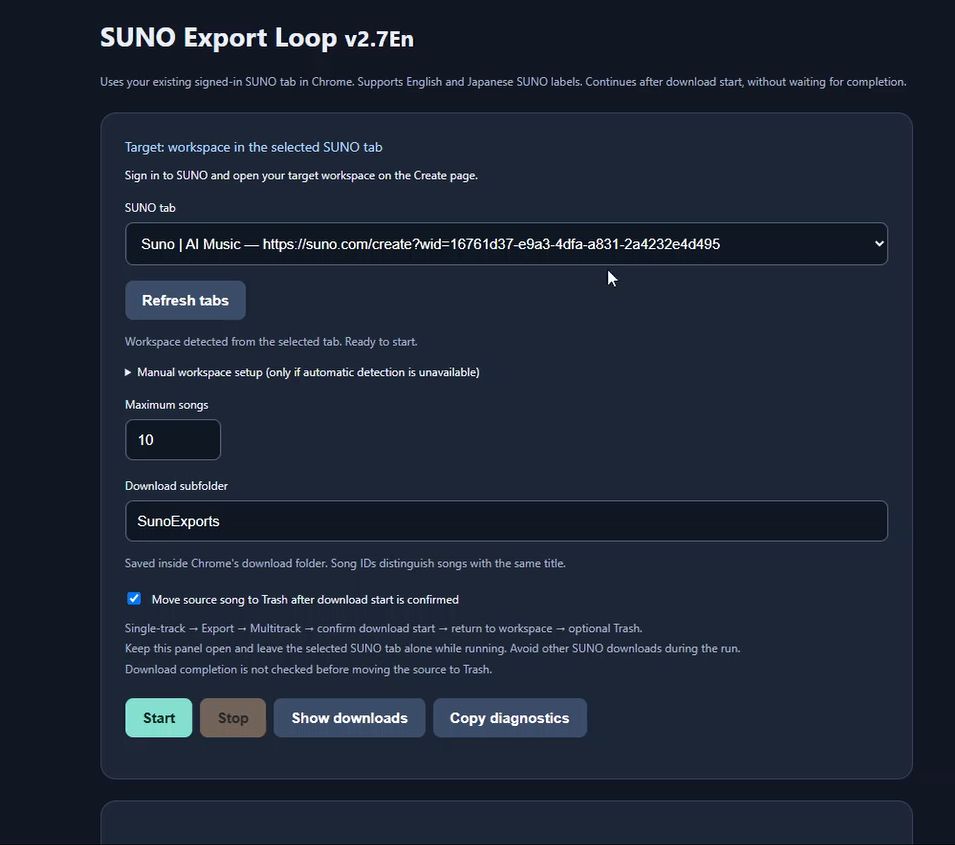
SUNO Export Loop v2.7En
Spend less time clicking through exports and more time making music.
SUNO Export Loop is a Chrome extension that automates repetitive export steps in your SUNO workspace. It works with your existing signed-in SUNO tab, opens songs in Studio, and repeats the Single-track → Export → Multitrack workflow.
Features
- Repeated exports: Set a processing limit from 1 to 100 songs. Processing is limited to songs visible on the page; automatic scrolling is not included.
- Automatic workspace detection: Detects the workspace from the selected SUNO tab when its URL contains a workspace ID.
- Organized downloads: Saves ZIP exports in a download subfolder, using song titles and song IDs to distinguish files.
- Optional workspace cleanup: Can move source songs to Trash after download start is confirmed.
- English interface: Recognizes supported SUNO controls in both English and Japanese.
How it works
- Open your target workspace in SUNO.
- Open the extension and select your SUNO tab.
- Choose the song limit, download folder, and cleanup setting.
- Click Start and keep the extension panel open while it runs.
The extension operates SUNO’s existing interface. It does not perform stem separation itself or select the paid stem-separation workflow.
Requirements and installation
- Google Chrome on a desktop computer.
- A signed-in SUNO account with access to the Studio and export features used by this workflow.
- Manual installation: extract the supplied ZIP, enable Developer mode in Chrome’s extensions page, and select Load unpacked.
No Node.js or separate browser installation is required. Keep the extracted extension folder on your computer.
Important information
The extension confirms download start, not download completion. Keep Chrome open until all downloads have finished.
The Move source song to Trash option is enabled by default in this version. Turn it off before starting if you want to keep source songs in your workspace. When enabled, songs may be moved to Trash before their downloads finish. The extension never empties Trash.
Leave the selected SUNO tab untouched during processing and avoid starting other SUNO downloads at the same time. Closing the extension panel stops the loop.
Compatibility depends on SUNO’s interface and export workflow. Changes to SUNO may require an extension update.
What you receive
A downloadable ZIP containing the Chrome extension and an English README with installation and usage instructions.
This is an independent third-party tool and is not affiliated with or endorsed by SUNO. A SUNO subscription is not included.
English-language Chrome only. This extension is intended for use only with Google Chrome’s display language set to English. Other Chrome interface languages are not supported.
No Support or Compatibility Guarantee
This product is provided without technical support.
Changes to SUNO’s interface or export workflow may cause the extension to stop working. No support, fixes, or compatibility updates will be provided if this occurs. Future compatibility with SUNO is not guaranteed.
Future Versions and Upgrades
Your purchase includes only the version sold at the time of purchase. Free upgrades to future versions are not included. If a new version is released, you must purchase it separately to use it.
This policy reduces administrative overhead and allows us to offer the software at a lower price.
レビュー
レビューはまだありません。